SmallHD 1303 Studio Calibration Overview
The SmallHD 1303 Studio is a 13-inch HD production monitor from SmallHD, specifically for studio and indoor workflows. It features a 1920×1080 IPS panel at around 400 nits, making it well-suited for controlled lighting environments where extreme brightness isn’t required.
In practical terms, the SmallHD 1303 Studio is essentially the "indoor counterpart" to the 1303 HDR, offering the same tools and usability, but tailored for video village, editing bays, or controlled set environments where consistent color and reliability matter more than daylight visibility.
Below is an overview of the display's performance before and
after professional SmallHD 1303 Studio calibration.
A 3D LUT calibration was done as the SmallHD 1303 Studio has internal LUT storage.
Equipment, software and target used in the calibration:
- Calibration software: DCM
- Colorimeter: Admesy PCM2X-271
- Spectro: CR-300
- Patch generator: Murideo 6G 8K
- Calibration target: Rec 709 D65 G2.4 max nits
- LUT storage: 33^3 internal
Native Gamut
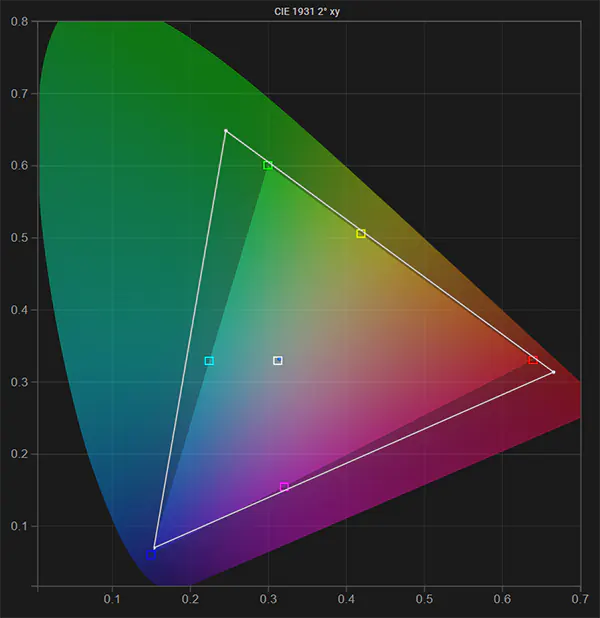
This is the native gamut (before calibration) of the SmallHD 1303 Studio compared to the Rec 709 color space calibration target. The display does not fully cover Rec 709 blue.
White Point
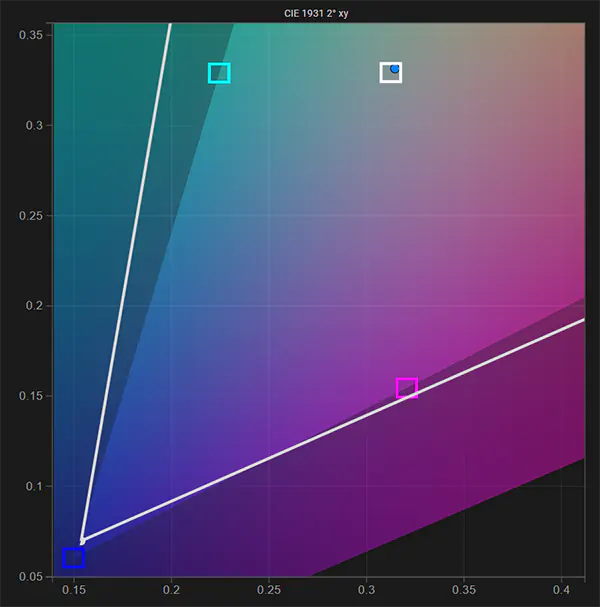
This is a close-up of the native white point (before calibration) compared to the calibration target of D65, the display white point shows a yellow tint. You can also see that R709 blue is not fully covered.
RGB Balance
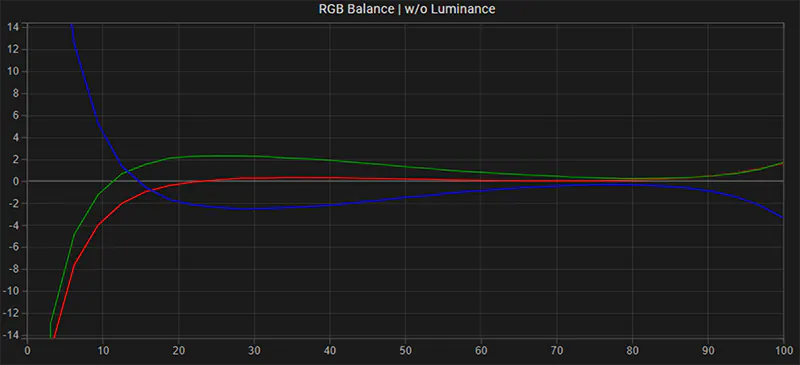
This is the Greyscale RGB balance before 3D LUT calibration, it has a yellow tint in parts of the luminance range.
EOTF: Gamma
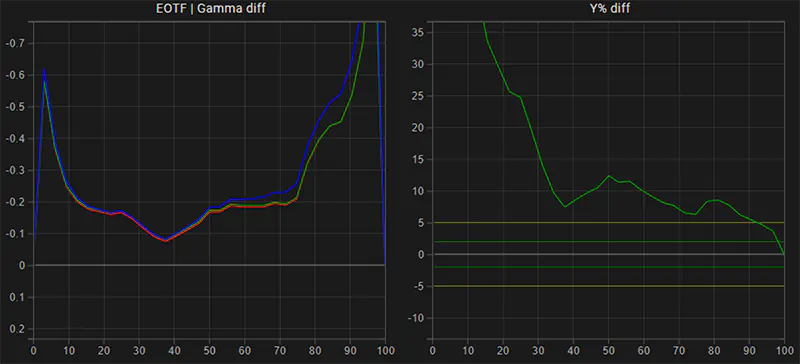
This is the native gamma and luminance response of the SmallHD 1303 Studio. The reference line is configured for the calibration target G2.4. In its default native state, the display's brightness is non-linar and significantly higher than the calibration target.
Calibration
After display preparation and configuration, a large display profile is run to create a detailed characterization of the display. From that profile data, a 3D LUT is then generated by DCT and uploaded into the display.
Gamut & White Point (post)
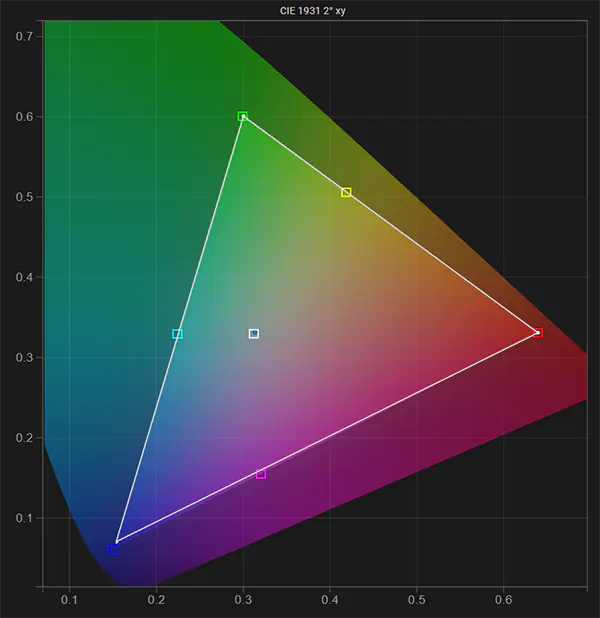
Gamut (post calibration) compared to the Rec 709 D65 target: white, red, green are on target - blue has been corrected to the max capability of the display.
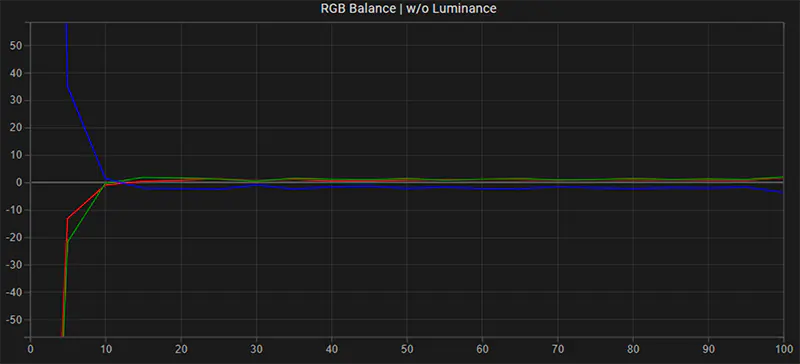
RGB Balance (post)
This is the Greyscale RGB balance post-calibration, a huge improvement.
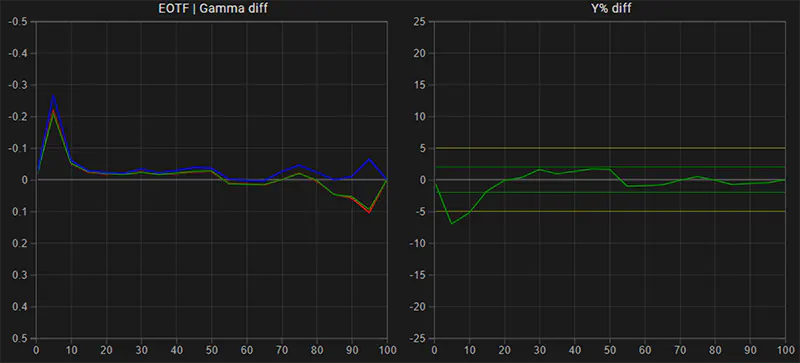
EOTF: Gamma (post)
This is the gamma and luminance response of the SmallHD 1303 Studio after calibration compared to the reference calibration target G2.4. A significant improvement, the display now tracks the reference very closely.
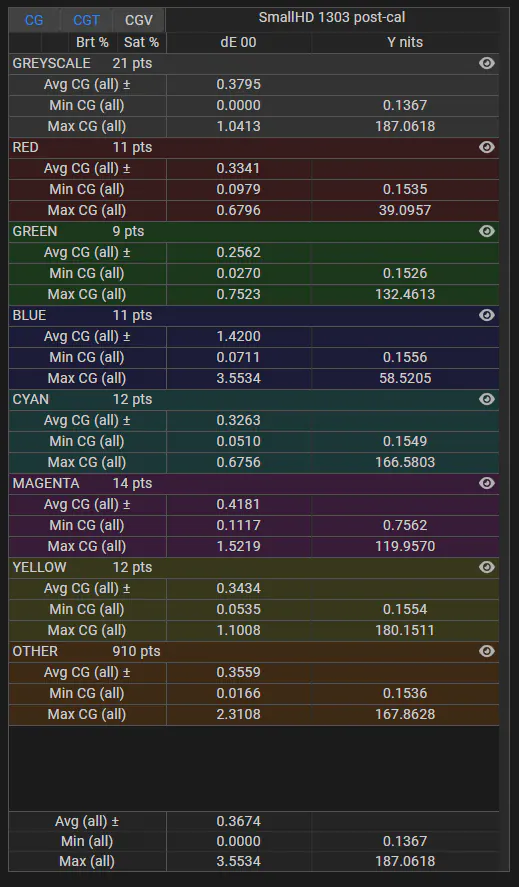
Color Error: delta E 2000 (post)
These are the dE 2000 stats post calibration for a 1,000 point stress test validation profile. With an average dE 2000 color error of only 0.36, the SmallHD 1303 Studio now performs exceptionally well given that the JND (just noticeable difference) for human vision is set at a dE 2000 value of 2.3. Blue region performs worst dE wise, this is because (as noted above) the display cannot fully reach R709 blue, it is under-saturated in highly saturated blue colors.
For inquiries regarding display calibration on location in Los Angeles and Southern California or remote worldwide please visit our professional display calibration services page. For inquiries regarding our professional calibration software solutions, please contact us here.
Stay informed about our professional calibration solutions, new display calibration guides and workflows, and exclusive promotional offers - register here for free.
For other Display Calibration Guides & Workflows, please click here.