Benq SW272U Calibration Overview
The SW272U is a 27-inch IPS monitor from Benq, designed for photographers and color-critical work, offering wide gamut coverage (Adobe RGB and P3). It uses an IPS panel with a nano-matte coating for reduced reflections and consistent viewing, plus uniformity correction to maintain even brightness and color across the screen.
The Benq SW272U is en entry level choice in the professional display market, used for color work, editing or graphic design.
Below is an overview of the display's performance before and after professional Benq SW272U calibration.
A 3D LUT calibration was done and the resulting cLUT was then loaded into the BMD Micro Converter LUT box.
Equipment, software and target used in the calibration:
- Calibration software: DCM
- Colorimeter: Admesy PCM2-100
- Spectro: CR-300
- Patch generator: DaVinci Resolve, SDI out
- Calibration target: Rec 709 D65 G2.4 120 nits (SDR)
- LUT holder: BMD Micro Converter 33^3
Native Gamut
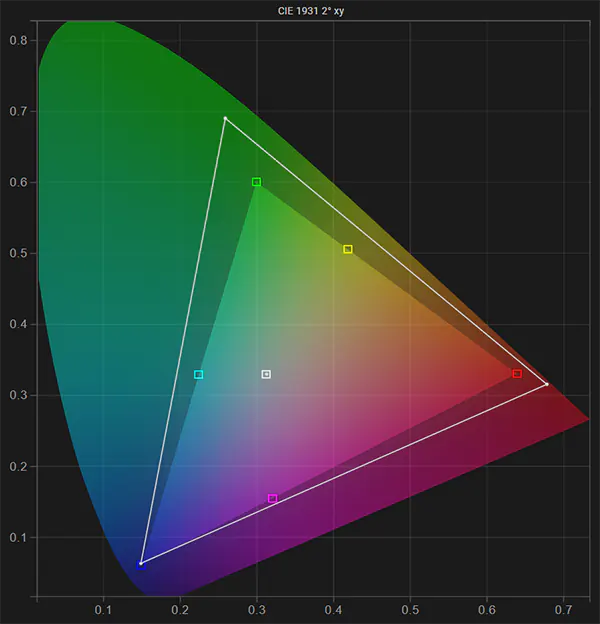
This is the native gamut (before calibration) of the Benq SW272U compared to the Rec 709 color
space calibration target. The display's native gamut fully covers the target color space, making it ideal for accurate display calibration.
The white point was calibrated manually using the display's CMS gain controls.
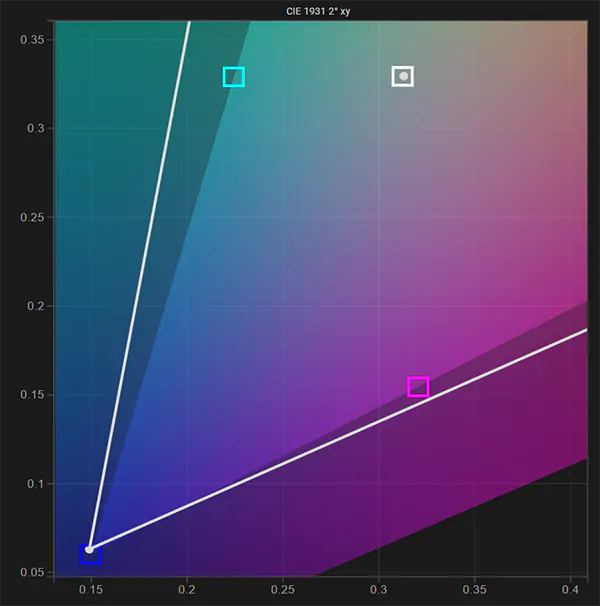
White Point
This is a close-up of the manually pre-calibrated white point (before calibration) compared to the calibration target of D65. It is on target.
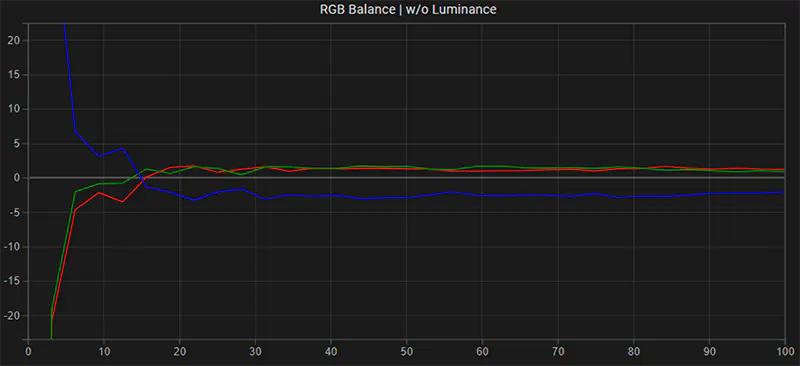
RGB Balance
This is the greyscale RGB balance before LUT calibration. The greyscale was manually calibrated using the display's CMS gain controls, it has a slight yellow tint.
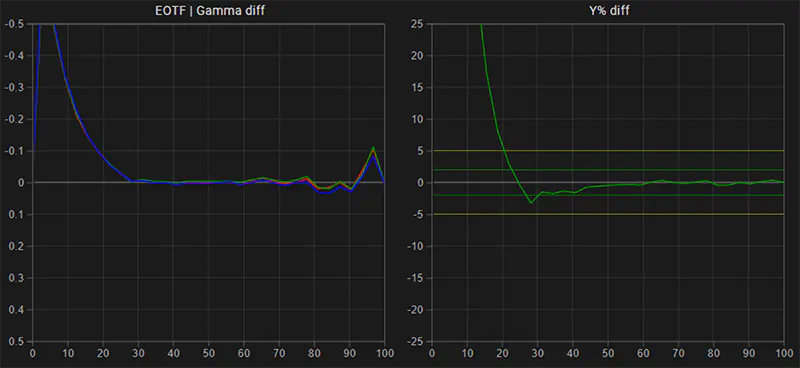
EOTF: Gamma
This is the native gamma and luminance response of the Benq SW272U. The reference line is configured for the calibration target of G2.4. In its default native state, the display is too bright in the shadows.
Spectrum Analysis
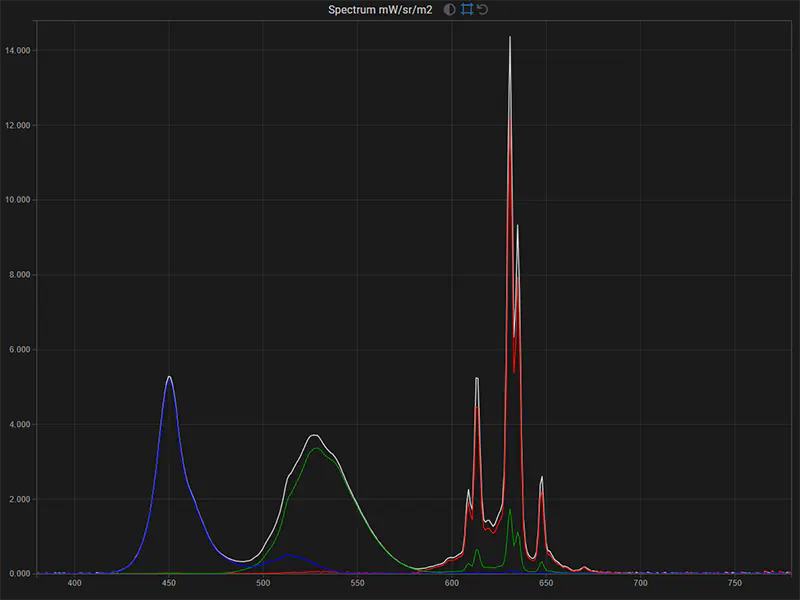
This is the spectrum of the Benq SW272U in native gamut for full white, with the red, green and blue primaries
spectral output overlaid to identify color channel issues. The R, G, B color channels match the white response well, this is ideal.
Notice the spiky spectral response and narrow peaks, a high-end spectrometer is needed to measure this panel accurately.
Calibration
After display preparation and configuration, a large display profile is run to create a detailed characterization of the display. From that profile data, a 3D LUT is then generated by DCT and loaded into the BMD Micro Converter LUT box.
Gamut & White Point (post)
Gamut (post calibration) compared to the Rec 709 D65 target - both color space and white point are on target.

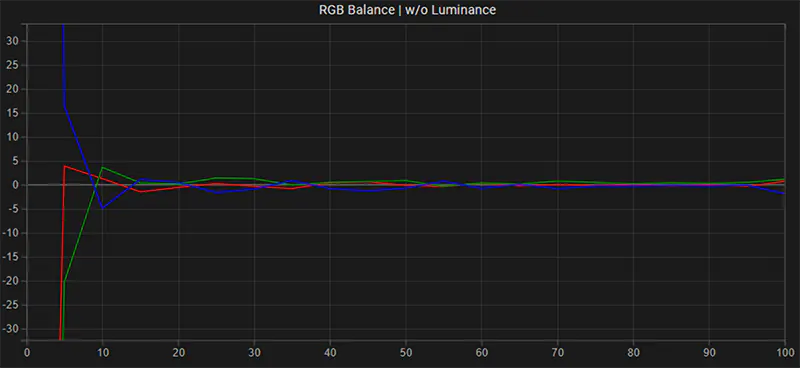
RGB Balance (post)
This is the Greyscale RGB balance post-calibration, excellent result.
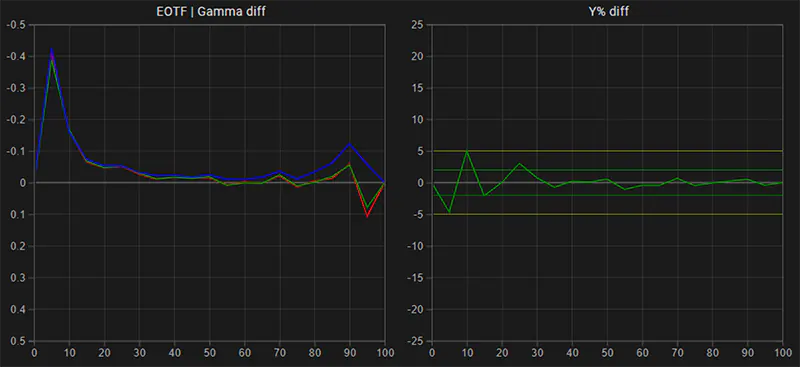
EOTF: Gamma (post)
This is the gamma and luminance response of the Benq SW272U after calibration compared to the reference calibration target G2.4. The display now tracks the reference very closely.
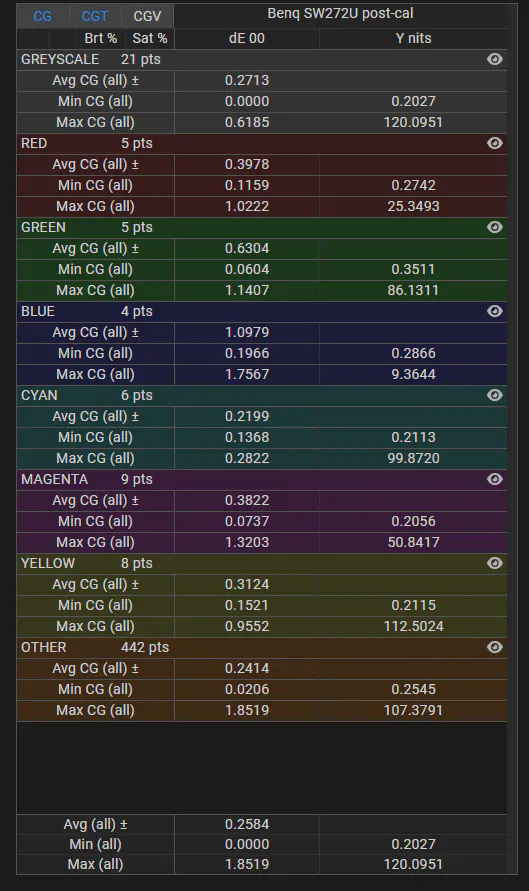
Color Error: delta E 2000 (post)
These are the dE 2000 stats post calibration for a 500 point stress test validation profile. With an average dE 2000 color error of only 0.25, the Benq SW272U now performs exceptionally well given that the JND (just noticeable difference) for human vision is set at a dE 2000 value of 2.3.
For inquiries regarding display calibration on location in Los Angeles and Southern California or remote worldwide please visit our professional display calibration services page. For inquiries regarding our professional calibration software solutions, please contact us here.
Stay informed about our professional calibration solutions, new display calibration guides and workflows, and exclusive promotional offers - register here for free.
For other Display Calibration Guides & Workflows, please click here.